
- Ensure you are in a quiet, safe space with access to a computer or device with camera/microphone.
-
If you can provide the following information to us at your visit it would be very helpful:
-
Height, weight, blood pressure, temperature
-
BEFORE YOUR VISIT
READY FOR YOUR TELEMEDICINE APPOINTMENT?
Follow the instructions below!
1. Use a computer or device with camera/microphone
2. Click the button below to start your visit
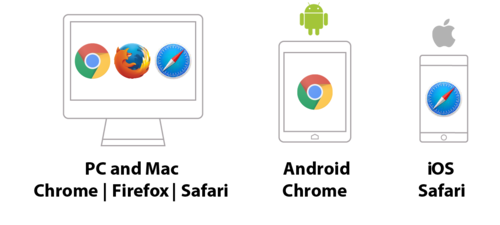
3. Type in your full legal name and click Check In

4. Allow your browser to use your webcam and microphone
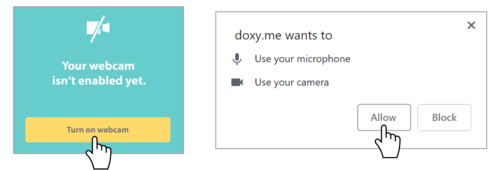
5. Your care provider will start your visit!

When it is time for your appointment please go to the appropriate link for your doctor listed below:
Frequently Asked Questions
What is telemedicine and what can it be used for?
Telemedicine lets you connect to your provider remotely over video. Telemedicine is a great alternative for visits that do not need a physical exam.
What are the advantages of telemedicine?
- Telemedicine makes it possible for you to consult with your primary care physician via video.
- Allows access to specialty care
- Reduced chances of catching a new illness. (Reduces risks of exposure to communicable diseases – especially important for persons with compromised immunity, pregnant women or elderly)
- Eliminated transportation time and costs:
- Money spent on gas, parking, and public transportation are immediately terminated. Also, providing immediate relief to those in rural areas or with limited physical abilities.
- Not required to take time off from work or school.
- Broader reach to specialists:
- Some visits with specialists require longer commute times. When you’re dealing with a serious health ailment, you should be able to consult with the best.
- Convenience
How do I schedule a telemedicine appointment?
At this time please call your medical provider’s office to schedule a telemedicine appointment to determine if your medical concern can be handled remotely.
As a new patient, am I eligible?
We are working quickly to offer telemedicine for new patients. In the meantime please call the office to schedule your first appointment.
Will my insurance cover my visits?
During this coronavirus outbreak most insurance companies are expanding their coverage for telemedicine. Typically a telemedicine visit is treated the same way as an in-person visit for insurance billing purposes. For individual coverage questions, always contact your insurance provider.
What types of visits can I schedule through telemedicine?
Telemedicine visits are great for follow-up visits, medication questions, reviewing lab and test results and general questions. Some examples include consultations for birth control and contraception, menstrual problems, and mental wellness.
Privacy
Care for Womens Medical Group uses secure and HIPAA compliant video platforms to protect patients’ health information and privacy.
How can I check – in for my first telemedicine appointment?
Your providers office will share a personalized web link with you. This link works with any browser on a computer/device that is equipped with camera and microphone.
What devices can I use for my appointment?
You can use a computer with a webcam or a smartphone with camera and microphone. Please ensure you have adequate broadband internet connection or a data plan for your smartphone.
Do I need to sign up for an account?
No, as a Care for Womens Medical Group patient you actually don’t need to create an account with Doxy.me to see a Care for Womens Medical Group provider. You can simply go to the Care for Womens Medical Group unique link/url you receive after you book your appointment. You will check in and your Care for Womens Medical Group provider will start the call when they are ready.
Is this secure?
All data is encrypted, patient sessions are anonymous (Doxy.me will not know who you are) and no patient info is stored persistently. Doxy.me uses the AES cipher with 128-bit keys to encrypt audio/video, and HMAC-SHA1 to verify data integrity.
How do I get rid of an echo?
The following steps should be done by you and your provider:
- Use headphones
- Reduce the volume of speakers
- Move the microphone away from the speakers
How can I improve video quality?
- Restart your computer: restart your computer before your first call.
- Wifi: be close to your wifi router, make sure no other parties on the network are using up the bandwidth, and you don’t have a lot of browser windows open.
- CPU/GPU usage: ensure no high intensity programs are running on the computer.